HOME
DIVI BEGINNERS
TUTORIALS
TROUBLESHOOTING
SUBMIT A TICKET
HOME
DIVI BEGINNERS
TUTORIALS
TROUBLESHOOTING
SUBMIT A TICKET
home
/
Knowledge Base
/
1. Getting - Started
/
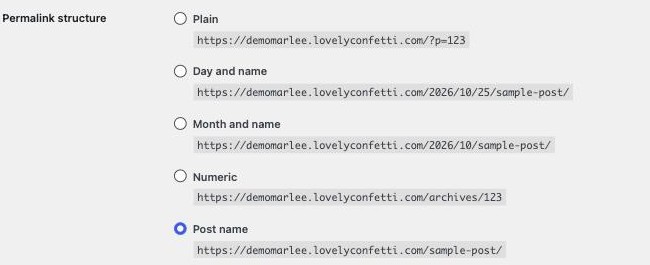
Step 5. Setup permalinks
Step 5. Setup permalinks
Go to
Settings > Permalinks,
select
“Post name”
and click
Save Changes.
Related Articles
Step 7. Import DIVI BUILDER ( Footer / Header / Blog Post,… )
Step 6. Import DEMO content
Step 4. Setup plugins
Step 3. Activate your product
Step 2. How To Install Theme
Step 1. Introducing Your Divi Child Theme
Step 4. Setup plugins
Step 1. Introducing Your Divi Child Theme