HOME
DIVI BEGINNERS
TUTORIALS
TROUBLESHOOTING
SUBMIT A TICKET
HOME
DIVI BEGINNERS
TUTORIALS
TROUBLESHOOTING
SUBMIT A TICKET
home
/
Knowledge Base
/
2. Meryl - Use Divi Visual Builder
/
Meryl – How to edit CTA Boxes
Meryl – How to edit CTA Boxes
Click on Enable Visual Builder in the top bar.
Making changes to text with the Divi Visual Builder is as simple as clicking and typing and change your backgrounds.
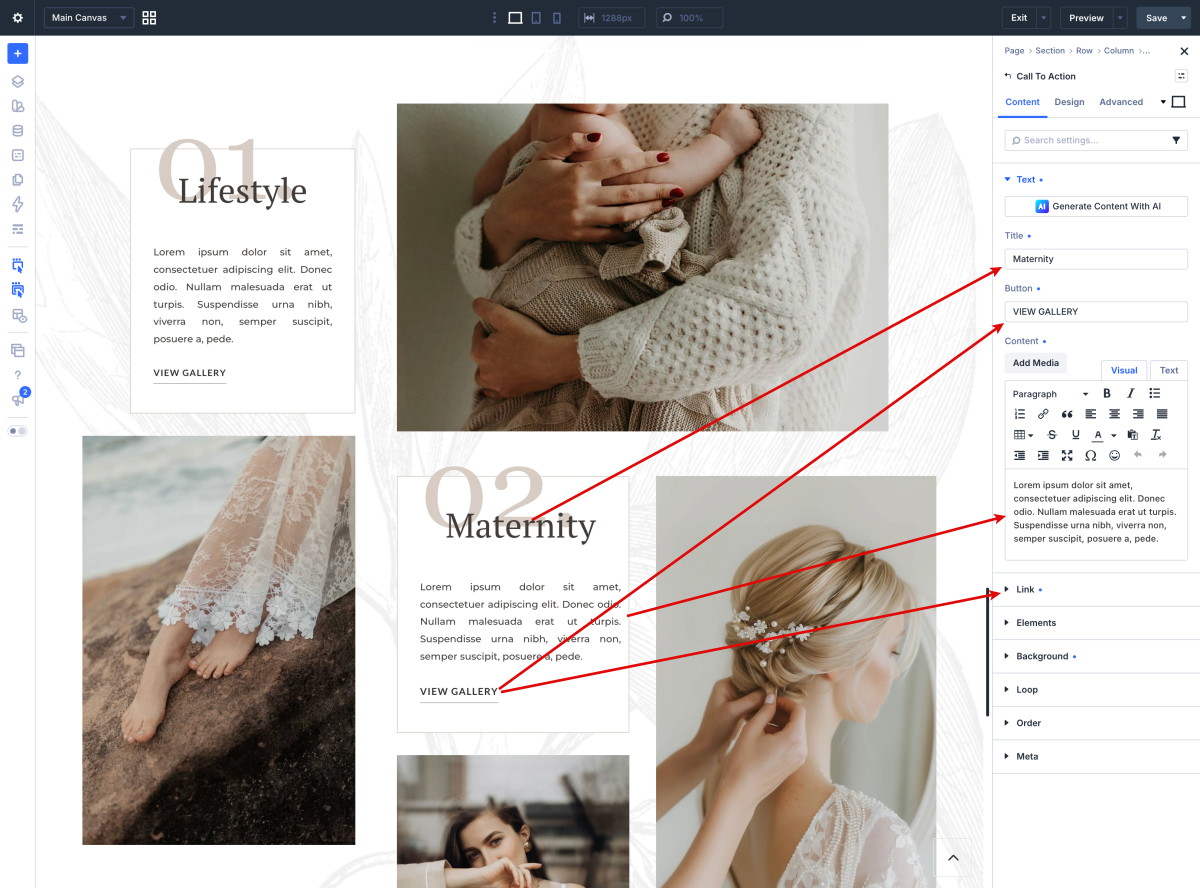
Edit the Call to Actions:
https://www.support.helplovelyconfetti.com/wp-content/uploads/2020/09/Meryl-Services-Home-1.webm
Related Articles
Meryl – How to edit CTA Galleries
Meryl – How to edit About Me
Meryl – How to edit Hero
Meryl – How to edit texts
Meryl – How to edit images
Meryl – How to enable the Divi Visual Builder
Meryl – How to edit CTA Galleries
Meryl – How to edit About Me