What is the Divi Library and why save or load an existing layout:
The Divi Library is place that stores pre-made layout templates as well as your custom saved layouts, modules and widgets (Divi > Divi Library).
Save a layout to the Divi Library if you would like to use it as a template for other posts or pages. This will cut down on the creation time needed for those future posts or pages.
To Load a Layout from your Divi Library or duplicate a page:
This is a good option if you want reset your page and rebuild a demo page again (You have all demo page layouts in Divi Library).
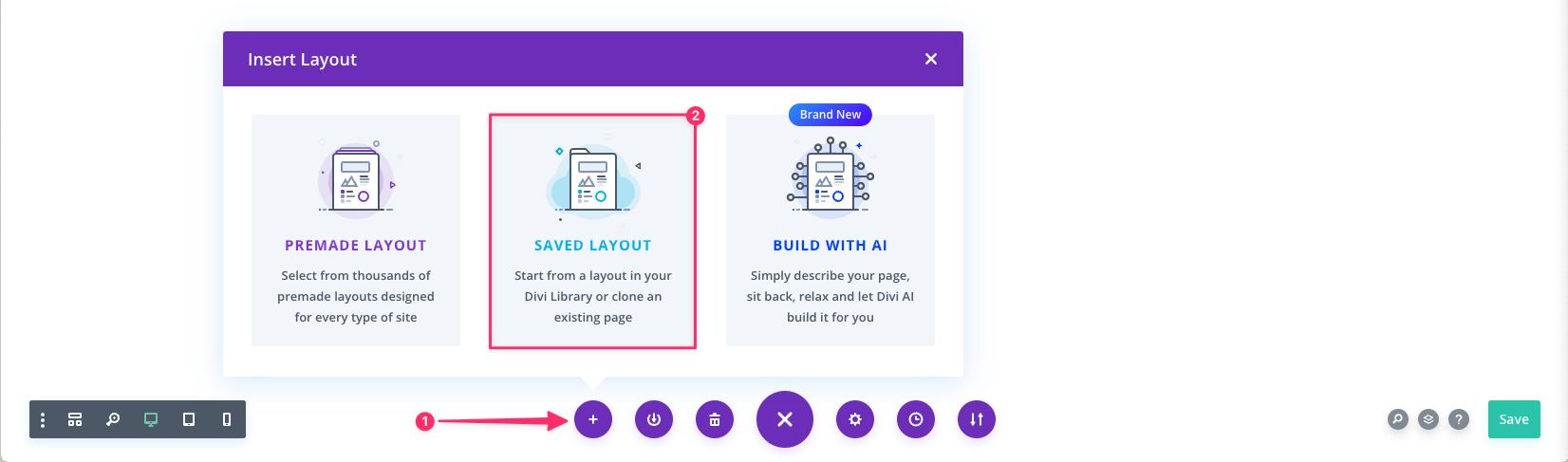
- First you want to add a new page or post depending on what you’re creating.
- Open the Visual Builder toolbar by clicking on the Ellipsis icon

- Click on the Insert Layout icon

- Click on the Use This Layout button.
- Click on the Saved Layout option.
- Choose the layout you want to import.
To Save a Layout in your Divi Library:
- Open the Visual Builder toolbar by clicking on the Ellipsis icon
- Click on the Save icon

- Give it a name which will be used to identify the layout when loading it in the future.
- Click on the Save to Library button.