HOME
DIVI BEGINNERS
TUTORIALS
TROUBLESHOOTING
SUBMIT A TICKET
HOME
DIVI BEGINNERS
TUTORIALS
TROUBLESHOOTING
SUBMIT A TICKET
home
/
Knowledge Base
/
4. Jane Pro - Theme Settings
/
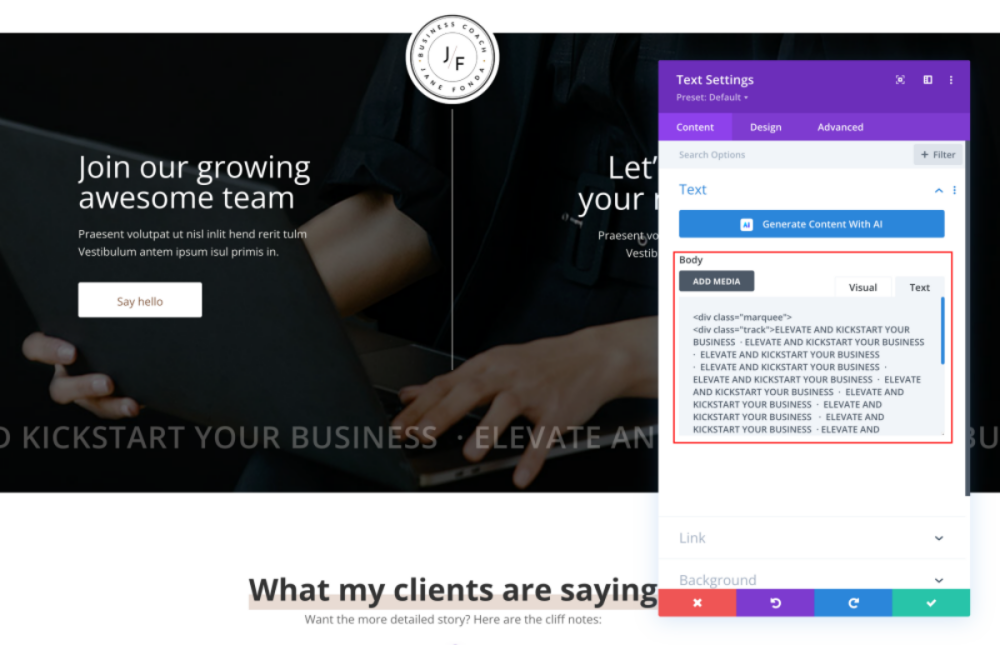
Jane Pro – How To Add A Marquee Banner
Jane Pro – How To Add A Marquee Banner
Click on Enable Visual Builder in the top bar.
Go to
Text Module> Text tab > Add your banner text.
Add your Page Link.
https://www.support.helplovelyconfetti.com/wp-content/uploads/2022/07/Chloe-Marquee.webm
Related Articles
Jane Pro – How to add lovely icons to Blurbs
Jane Pro – How to Create an anchor text link in Resources and Sales Page
Jane Pro – How to Design a Product Page Template
Jane Pro – How to Design a Blog Post Template
Jane Pro – How to Import an Element from the Divi Library
Jane Pro – How to Save elements to the Divi Library
Jane Pro – How to add Filterable portfolio