• HOME
  • DIVI BEGINNERS
  • TUTORIALS
  • TROUBLESHOOTING
  • SUBMIT A TICKET
  • HOME
  • DIVI BEGINNERS
  • TUTORIALS
  • TROUBLESHOOTING
  • SUBMIT A TICKET
home/Knowledge Base/2. Jane - Use Divi Visual Builder/Jane – Choose your Home

Jane – Choose your Home

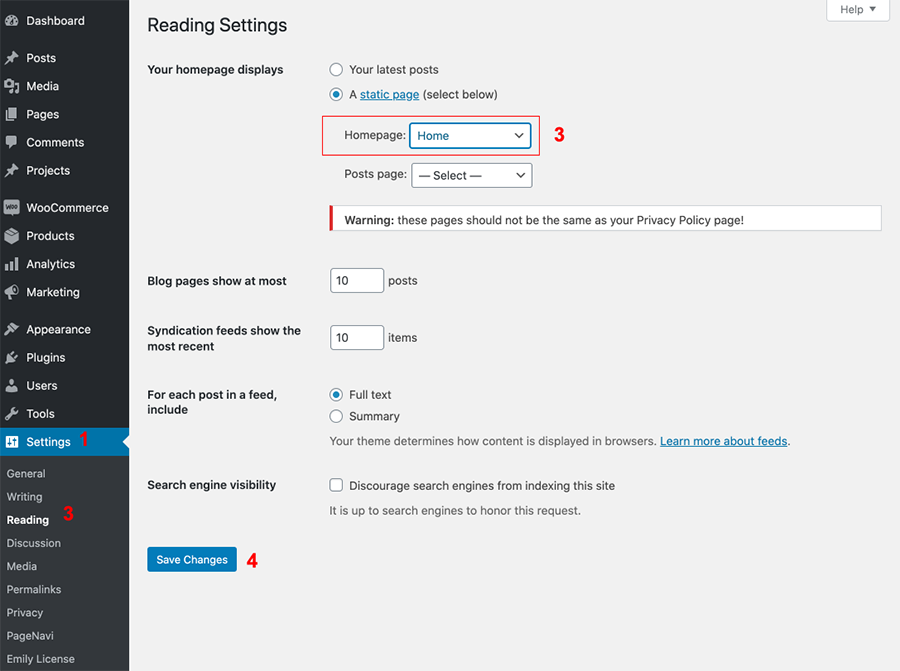
Jane has 3 Homepages to choose so you can choose one of the existing homes to be served as the Front Page of your site.

  1. Log into WordPress
  2. Go to Settings > Reading > Choose your Static Page.
  3. Choose your “Home” page from the Homepage drop down.
 

Related Articles
  • Jane – How to configure Blurb Services
  • Jane – How to edit form optin
  • Jane – How to edit testimonials
  • Jane – How to edit services
  • Jane – How to edit Hero
  • Jane – How to edit text
2. Jane - Use Divi Visual Builder
  • Jane – Choose your Home
  • Jane – How to enable the Divi Visual Builder
  • Jane – How to edit images
  • Jane – How to edit text
  • Jane – How to edit Hero
  • Jane – How to edit services
  • Jane – How to edit testimonials
  • Jane – How to edit form optin
View All 8  

  Jane – How to configure Blurb Services

  • Privacy Policy
  • Terms of Use
  • Copyright 2023. All Rights Reserved.