Do you want to use a beautiful coming soon page for your WordPress site? All my themes has a Coming Soon page if you want make changes in your site or need a pre-launch.
Step 1: Go to your Coming Soon Page and edit it.
- Go to Pages > All Pages > Look for Coming Soon demo page.
- Click on Enable Visual Builder in the top bar.
- Making changes to text and background with the Divi Visual Builder is as simple as clicking and typing
How to integrate MailChimp with Divi Builder: https://www.support.helplovelyconfetti.com/work/how-to-integrate-mailchimp-with-divi-builder/
How To Integrate ConverKit With Divi Builder: https://www.support.helplovelyconfetti.com/work/how-to-integrate-converkit-with-divi-builder/
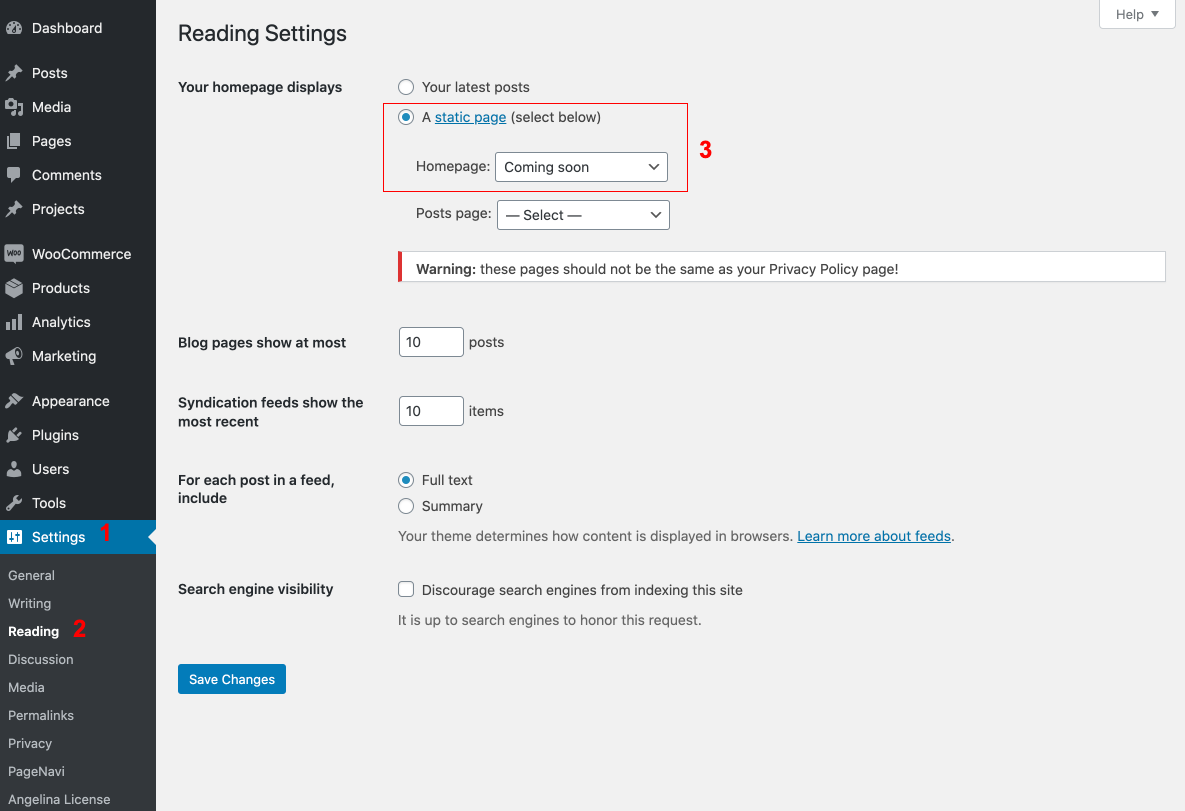
Step 2: Turn on Your Coming Soon Page
Go to Settings > Reading > Your homepage displays > Choose Coming soon as Homepage