HOME
DIVI BEGINNERS
TUTORIALS
TROUBLESHOOTING
SUBMIT A TICKET
HOME
DIVI BEGINNERS
TUTORIALS
TROUBLESHOOTING
SUBMIT A TICKET
home
/
Knowledge Base
/
2. Charlize - Use Divi Visual Builder
/
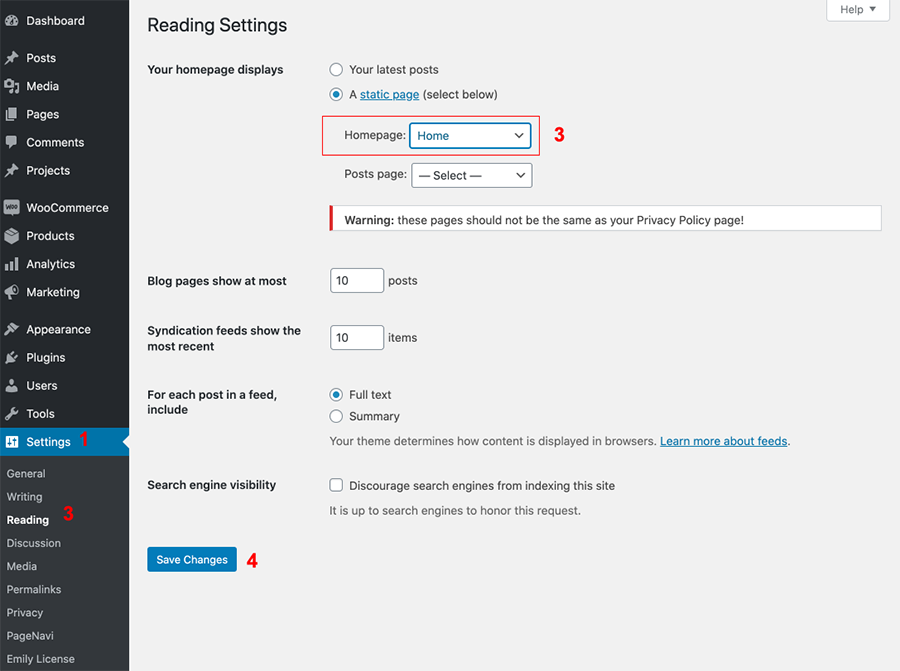
Charlize – Choose your Home
Charlize – Choose your Home
Log into WordPress
Go to
Settings > Reading > Choose your Static Page.
Related Articles
Charlize – How to choose your blog layout
Charlize – How to add Category Menu
Charlize – How to edit form optin
Charlize – How to edit Images
Charlize – How to edit Texts
Charlize – How to edit Hero Image
Charlize – How to add Category Menu