• HOME
  • DIVI BEGINNERS
  • TUTORIALS
  • TROUBLESHOOTING
  • SUBMIT A TICKET
  • HOME
  • DIVI BEGINNERS
  • TUTORIALS
  • TROUBLESHOOTING
  • SUBMIT A TICKET
home/Knowledge Base/1. Getting - Started Marlee/Step 3. Activate your product

Step 3. Activate your product

This licence only works for Divi Child Theme NOT Divi ( Parent Theme)

As you can read in Product listing and FAQS,

A copy of Divi is included in your download pack. However if you wish to make any updates to Divi a license is required. I would highly recommend purchasing a license if you are planning on making large customisations or adding any new pages as it will give you access to the latest builder and modules.

You can purchase a license HERE


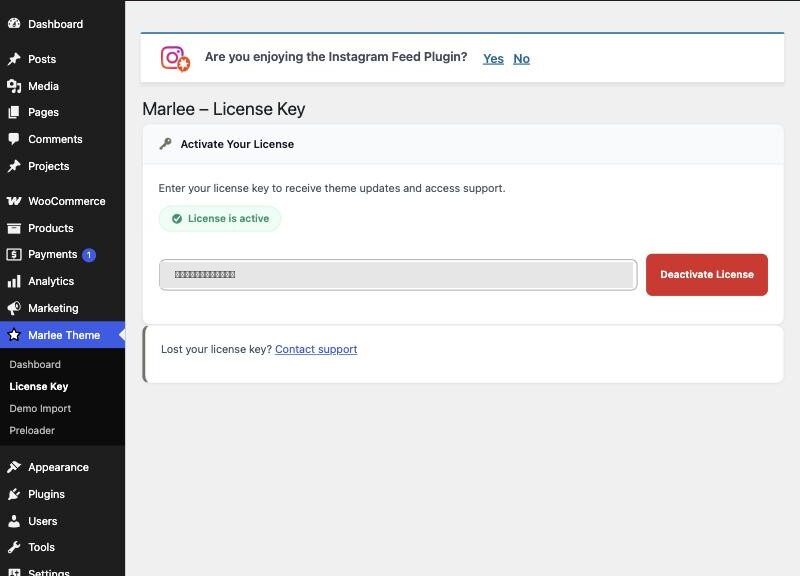
To activate your product and get updates please go to Settings > Yourtheme Licence and enter your Licence Key that you´ll find inside your package (yourtheme licence.pdf).

  1. In the WordPress dashboard, go to Marlee Theme → License Key.
  2. Paste the license key you received inside package (yourtheme licence.pdf) and click Activate License.
  3. Once it shows License is active, you’re ready to import the demo content.
Related Articles
  • Step 6: Set permalinks
  • Step 5: Import demo content
  • Step 4: Install the required plugins
  • Step 2. How To Install Theme
  • Step 1. Introducing Your Divi Child Theme
1. Getting - Started Marlee
  • Step 3. Activate your product
  • Step 1. Introducing Your Divi Child Theme
  • Step 2. How To Install Theme
  • Step 4: Install the required plugins
  • Step 5: Import demo content
  • Step 6: Set permalinks

  Step 1. Introducing Your Divi Child Theme

Step 2. How To Install Theme  

  • Privacy Policy
  • Terms of Use
  • Copyright 2023. All Rights Reserved.