• HOME
  • DIVI BEGINNERS
  • TUTORIALS
  • TROUBLESHOOTING
  • SUBMIT A TICKET
  • HOME
  • DIVI BEGINNERS
  • TUTORIALS
  • TROUBLESHOOTING
  • SUBMIT A TICKET
home/Knowledge Base/1. Getting - Started Marlee/Step 4: Install the required plugins

Step 4: Install the required plugins

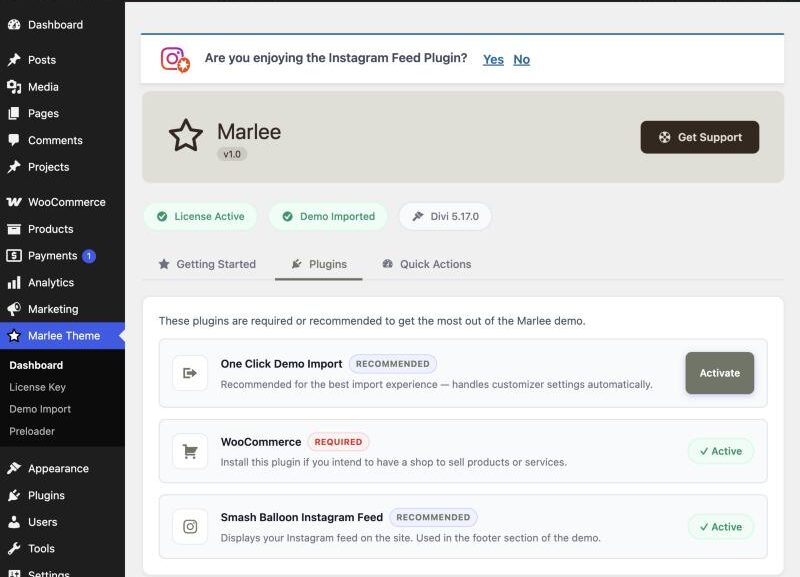
In the WordPress dashboard, go to Marlee Theme → Dashboard → Plugins. Install and activate:

  • WooCommerce (required) — needed if you’ll have a shop that sells products or services.
  • One Click Demo Import (recommended) — gives the best import experience; it also installs automatically in the next step if you skip it here.
  • Smash Balloon Instagram Feed (recommended) — powers the Instagram feed in the footer.
Related Articles
  • Step 6: Set permalinks
  • Step 5: Import demo content
  • Step 3. Activate your product
  • Step 2. How To Install Theme
  • Step 1. Introducing Your Divi Child Theme
1. Getting - Started Marlee
  • Step 4: Install the required plugins
  • Step 1. Introducing Your Divi Child Theme
  • Step 2. How To Install Theme
  • Step 3. Activate your product
  • Step 5: Import demo content
  • Step 6: Set permalinks

  Step 5: Import demo content

Step 1. Introducing Your Divi Child Theme  

  • Privacy Policy
  • Terms of Use
  • Copyright 2023. All Rights Reserved.