• HOME
  • DIVI BEGINNERS
  • TUTORIALS
  • TROUBLESHOOTING
  • SUBMIT A TICKET
  • HOME
  • DIVI BEGINNERS
  • TUTORIALS
  • TROUBLESHOOTING
  • SUBMIT A TICKET
home/Knowledge Base/3. Theme Settings/How to create a Blank Page Template (no header/footer)

How to create a Blank Page Template (no header/footer)

The blank page template disabled your header and footer and a specific page, leaving only what is built with the builder visible.

This is a great way to create unique landing pages that are separate from the rest of your website. For example, you might create a sales landing page, a coming soon page, instagram page, a newsletter optin page, or a maintenance mode page.

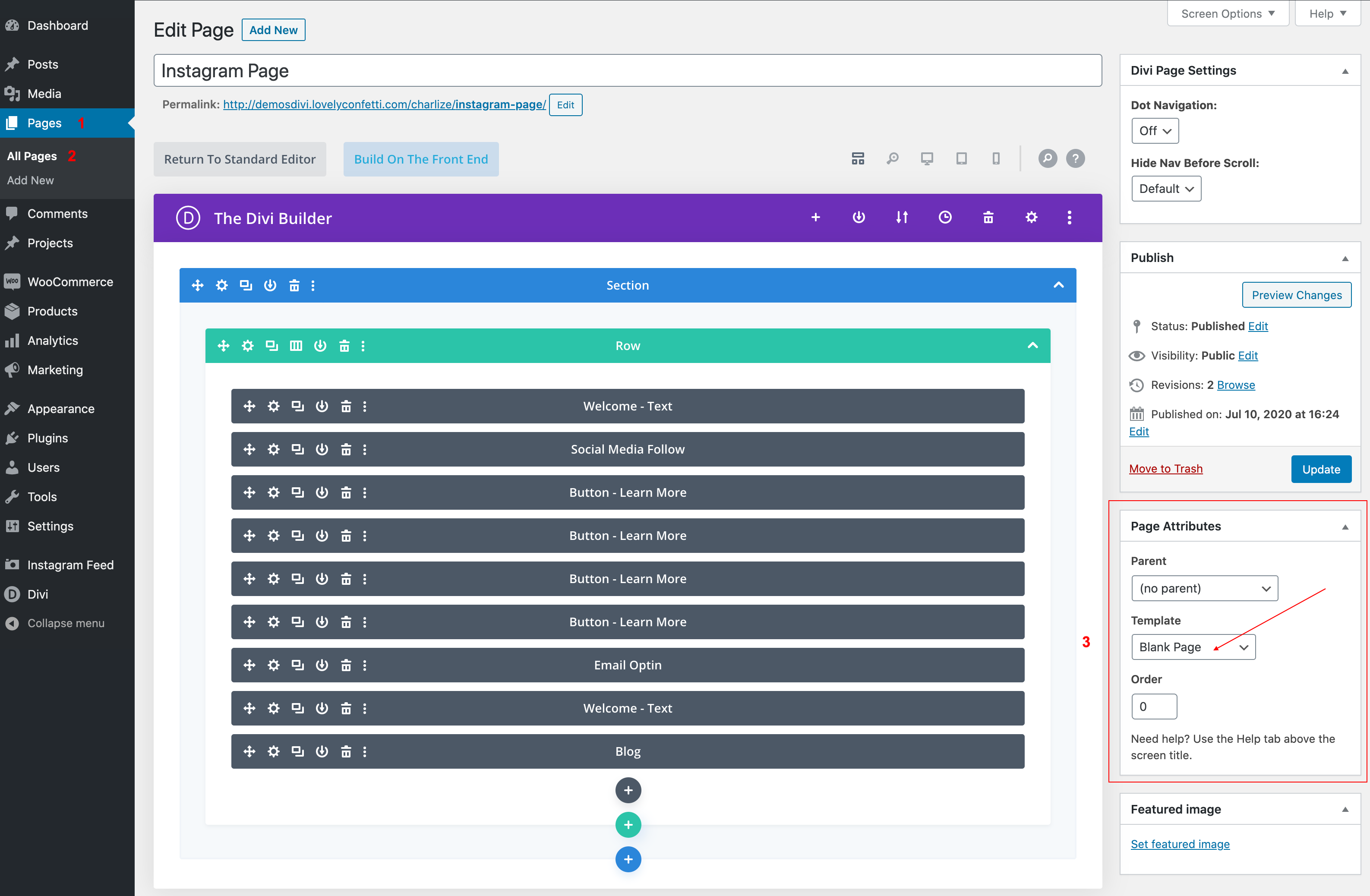
  1. When you create a new page, you will notice a settings box on the side of your screen.
  2. Go to “Page Attributes.”
  3. Dropdown menu, select the “Blank Page” template.
Related Articles
  • How to configure 404 Page
  • How to Add Shop (WooCoommerce)?
  • How Do I Make a Coming Soon Page?
  • How to add a Custom Font to your Divi website
  • How to add Instagram feed
  • How do I se tup menus
3. Theme Settings
  • How to create a Blank Page Template (no header/footer)
  • General options
  • How do I upload header logo
  • How do I se tup menus
  • How to add Instagram feed
  • How to add a Custom Font to your Divi website
  • How Do I Make a Coming Soon Page?
  • How to Add Shop (WooCoommerce)?
View All 8  

How to configure 404 Page  

  • Privacy Policy
  • Terms of Use
  • Copyright 2023. All Rights Reserved.