Adding an overlay to a Background image is really easy in Divi.
All you have to do is set a Background Color and then set the Background Blend Mode to Overlay.
However this does not work if Parallax Effect is set to Yes in the Background settings.

I will share a simple trick to add an overlay on background images that have a Parallax Effect.
Add Overlay Color to Parallax Background
To add a simple overlay on top of the Background Image in a Section or Row, open the Settings > Advanced > Custom CSS >

Before and then add the below code.
You´ll find a code like this:
content:"";
display: block;
position: absolute;
top: 0;
left: 0;
width: 100%;
height: 100%;
background-color: #404f4b;
opacity: 0.9;
z-index: 1;
Add Gradient Overlay to Parallax Background
The code to add a gradient overlay to a parallax background is very similar to the code above. However writing the css code for gradient is not easy.
Luckily you can use CSSGradient.io to generate the css code for the gradient.
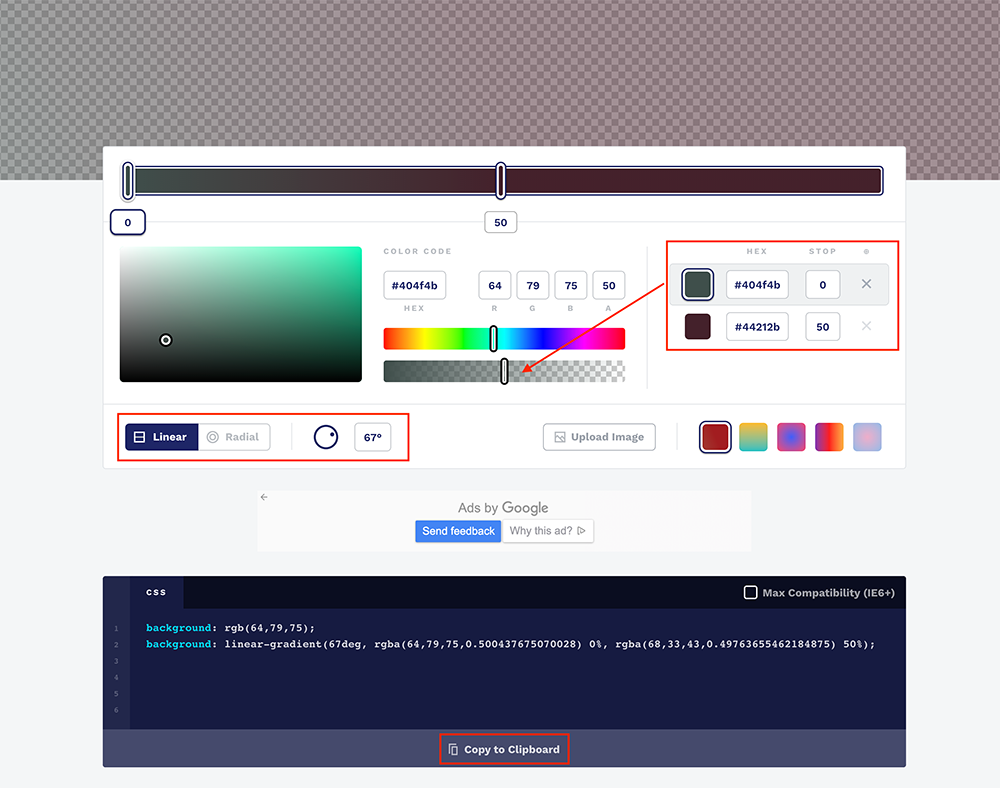
You have to use the controls at the top of style the gradient and then copy the CSS from the CSS box below the controls. Please see the below screenshot.
Next you just have to replace the background line from the code above with the background css that you copied from CSSGradient.io website.
In my case the updated would be:
content:"";
display: block;
position: absolute;
top: 0;
left: 0;
width: 100%;
height: 100%;
background: rgb(64,79,75);
background: linear-gradient(78deg, rgba(64,79,75,0.500437675070028) 0%, rgba(68,33,43,0.49763655462184875) 50%);
z-index: 1;
This is how it will look at the end.