• HOME
  • DIVI BEGINNERS
  • TUTORIALS
  • TROUBLESHOOTING
  • SUBMIT A TICKET
  • HOME
  • DIVI BEGINNERS
  • TUTORIALS
  • TROUBLESHOOTING
  • SUBMIT A TICKET
home/Knowledge Base/2. Halle - Use Divi Visual Builder/Halle – How to edit Call To Actions

Halle – How to edit Call To Actions

  1. Click on Enable Visual Builder in the top bar.
  2. You can access options for every Divi element by hovering, then clicking on the cog icon in the grey menu.
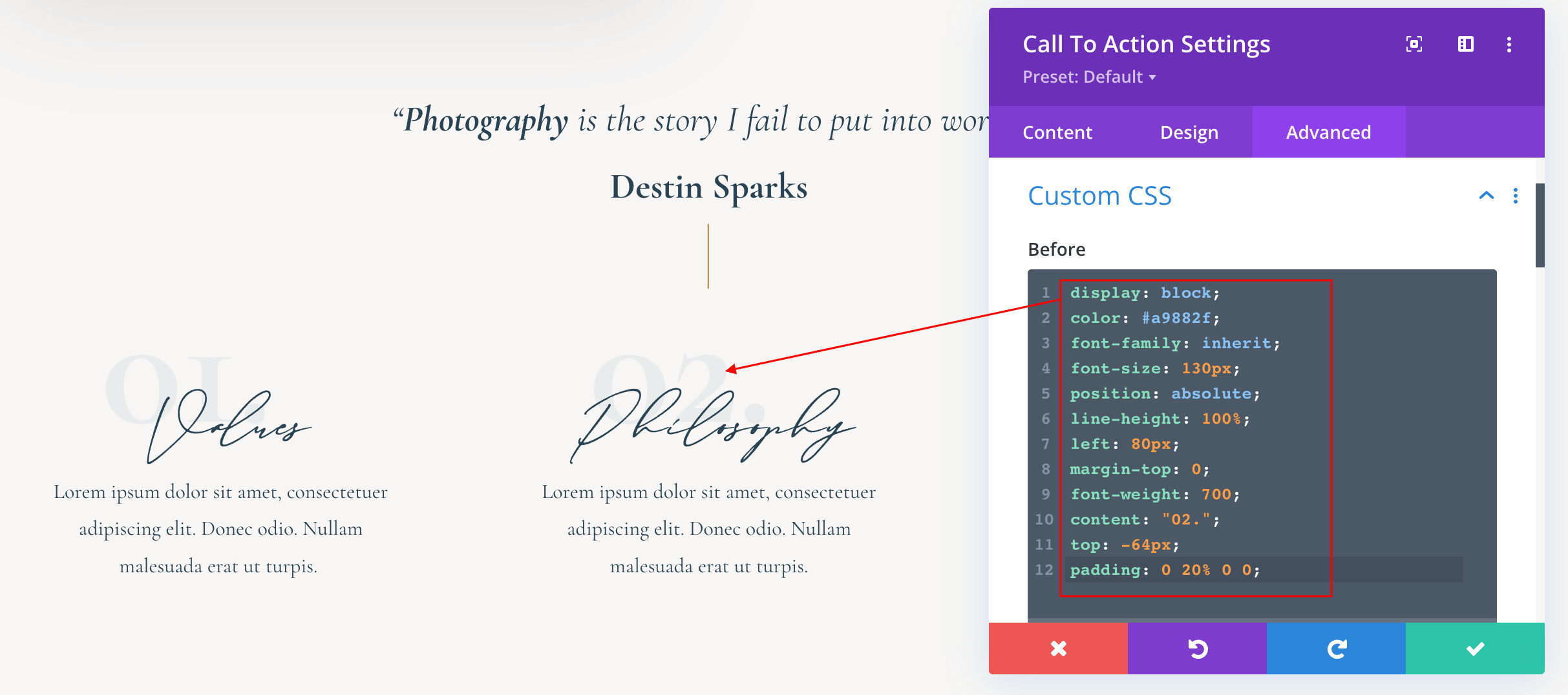
https://www.support.helplovelyconfetti.com/wp-content/uploads/2018/12/Halle-Call-To-action.webm

Need Further Tutorials?

Divi Builder overiew: https://www.elegantthemes.com/documentation/divi/visual-builder/

The Divi Call to Action: https://bit.ly/34mn0QJ

Related Articles
  • Halle – How to edit form optin
  • Halle – How to change header background image
  • Halle – How to edit images
  • Halle – How to edit text
  • Halle – How to enable the Divi Visual Builder
2. Halle - Use Divi Visual Builder
  • Halle – How to edit Call To Actions
  • Halle – How to enable the Divi Visual Builder
  • Halle – How to edit text
  • Halle – How to edit images
  • Halle – How to change header background image
  • Halle – How to edit form optin

  Halle – How to edit images

Halle – How to change header background image  

  • Privacy Policy
  • Terms of Use
  • Copyright 2023. All Rights Reserved.