HOME
DIVI BEGINNERS
TUTORIALS
TROUBLESHOOTING
SUBMIT A TICKET
HOME
DIVI BEGINNERS
TUTORIALS
TROUBLESHOOTING
SUBMIT A TICKET
home
/
Knowledge Base
/
4. Angelina - Theme Settings
/
Angelina – How to Create a Call to Action from a Menu Item
Angelina – How to Create a Call to Action from a Menu Item
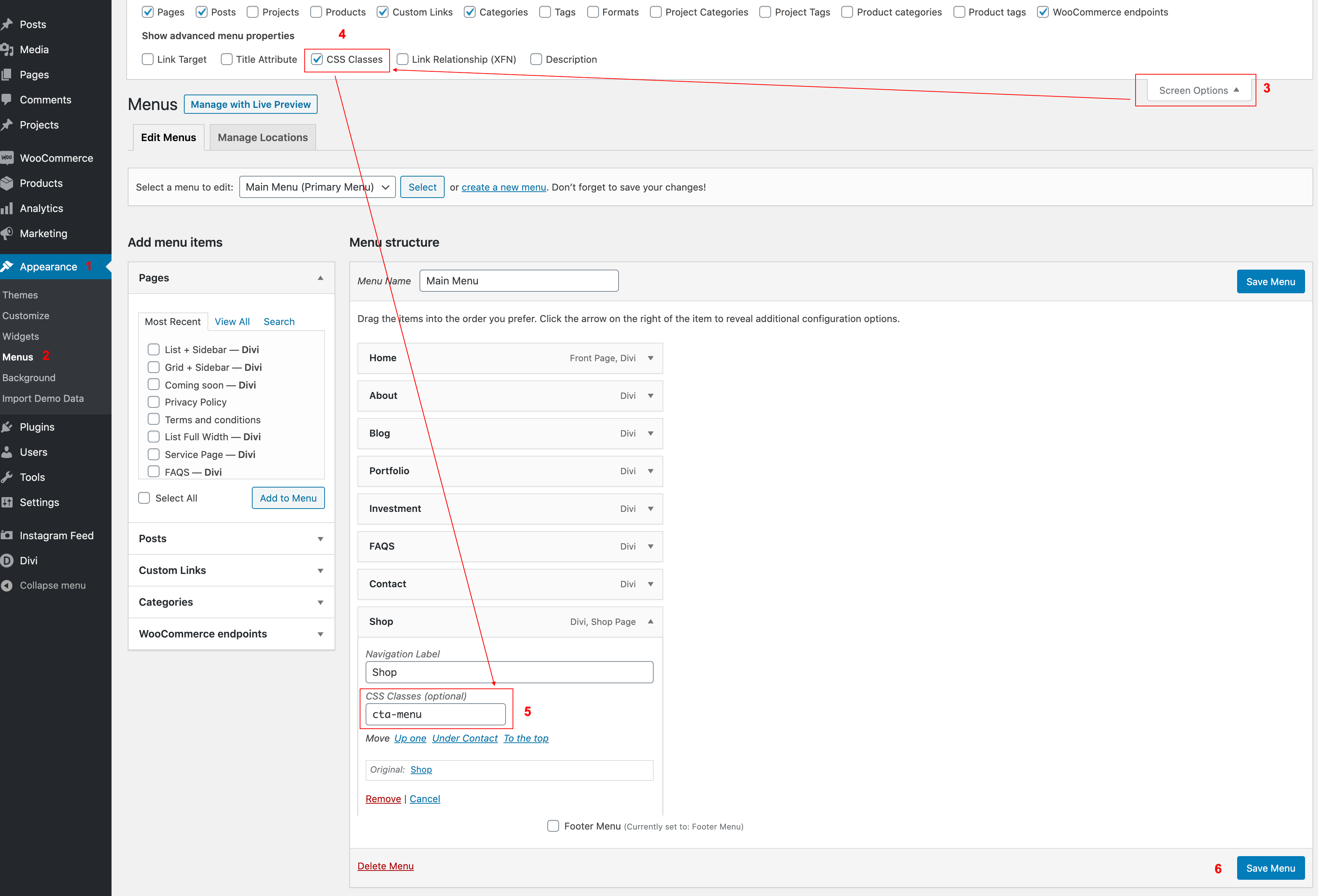
Log in to your WP Admin panel.
Navigate to
Appearance > Menus.
Click on “
Screen Options
” wich is located in the top corner and expand item.
Select CSS Classes.
Now go to your Menu item and
paste the CSS class (cta-menu).
Related Articles
Angelina – How to Design a Blog Post Template
Angelina – How to add Filterable portfolio
Angelina – How to edit Footer
Angelina – Theme Customization
Angelina – Theme Options
Angelina – How to Design a Blog Post Template
Angelina – How to add Filterable portfolio