• HOME
  • DIVI BEGINNERS
  • TUTORIALS
  • TROUBLESHOOTING
  • SUBMIT A TICKET
  • HOME
  • DIVI BEGINNERS
  • TUTORIALS
  • TROUBLESHOOTING
  • SUBMIT A TICKET
home/Knowledge Base/2. Vivien Pro - Use Divi Visual/Vivien Pro – Choose your Home

Vivien Pro – Choose your Home

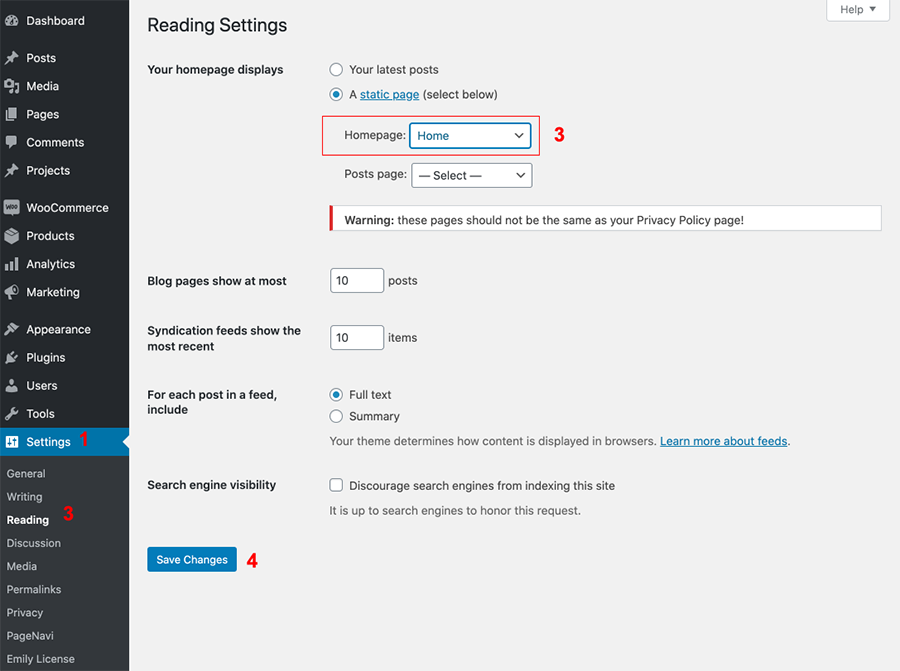
Vivien Pro has 4 Homepages to choose so you can choose one of the existing homes to be served as the Front Page of your site.

  1. Log into WordPress
  2. Go to Settings > Reading > Choose your Static Page.
  3. On the Reading Settings page choose A static page (select below) option for Your homepage displays.
  4. Then in the drop down choose your Homepage  and press the Save Changes button at the bottom.
  5. Do not assign Post Page.

Related Articles
  • Vivien Pro – How to configure Hero
  • Vivien Pro – How to edit Testimonials
  • Vivien Pro – How to edit Portfolio
  • Vivien Pro – How to edit Services
  • Vivien Pro – How to edit Carousel Slider
  • Vivien Pro – How to edit texts
2. Vivien Pro - Use Divi Visual
  • Vivien Pro – Choose your Home
  • Vivien Pro – How to enable the Divi Visual Builder
  • Vivien Pro – How to edit images
  • Vivien Pro – How to edit texts
  • Vivien Pro – How to edit Carousel Slider
  • Vivien Pro – How to edit Services
  • Vivien Pro – How to edit Portfolio
  • Vivien Pro – How to edit Testimonials
View All 8  

  Vivien Pro – How to configure Hero

  • Privacy Policy
  • Terms of Use
  • Copyright 2023. All Rights Reserved.