• HOME
  • DIVI BEGINNERS
  • TUTORIALS
  • TROUBLESHOOTING
  • SUBMIT A TICKET
  • HOME
  • DIVI BEGINNERS
  • TUTORIALS
  • TROUBLESHOOTING
  • SUBMIT A TICKET
home/Knowledge Base/4. Ingrid - Theme Settings/Ingrid – Theme Options

Ingrid – Theme Options

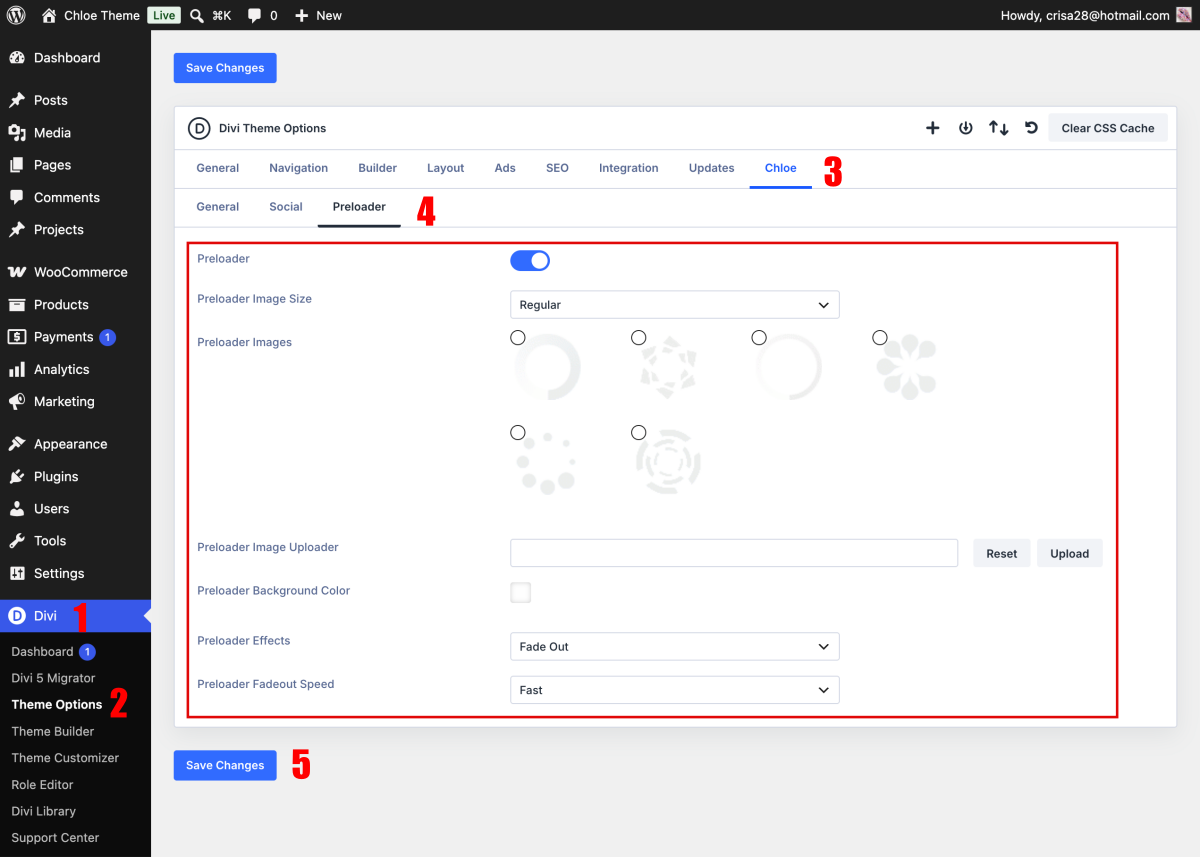
Ingrid features extensive customization options, which you can access in Divi > Theme Options > Ingrid.


Setup Preloader

Preloader – Disabled/Enabled
Preloader Image Size – Regular / Large
Preloader Images – select preloader image
Preloader Image Uploader – you can upload your own preloader/gif image
Preloader background color – define background color for preloader
Preloader Effects – define effect FadeOut/SlideUp
Preloader Fadeout Speed – define speed of preloader fadeout effect


Theme Options Social

This option only works if you use Divi default Header and Footer and allows you to add more Social Profiles to the default Divi Social icons/links, which can be displayed in the header or the bottom footer.

Related Articles
  • Ingrid – Theme Options
  • Ingrid – How to add lovely icons to Blurbs
  • Ingrid – How to Design a Blog Post Template
  • Ingrid – Saving And Loading Sections In Divi
  • Ingrid – Saving And Loading Layouts In Divi
  • Ingrid – How to add Filterable portfolio
4. Ingrid - Theme Settings
  • Ingrid – Theme Options
  • Ingrid – How to change global colors
  • Ingrid – How to Import and edit Footer
  • Ingrid – How to configure Header
  • Ingrid – How to configure Contact Form
  • Ingrid – How to add Filterable portfolio
  • Ingrid – Saving And Loading Layouts In Divi
  • Ingrid – Saving And Loading Sections In Divi
View All 10  

  Ingrid – Theme Options

Ingrid – Saving And Loading Sections In Divi  

  • Privacy Policy
  • Terms of Use
  • Copyright 2023. All Rights Reserved.